
Silo Nexus is an AI analysis layer built directly into Silo Workspace for digital investigations. Unlike general-purpose AI tools, Nexus operates entirely within your Silo session—analyzing your open tabs and captured content without exposing your research intent or identity to external providers.
Silo Nexus AI enables organizations to leverage AI-driven analysis without compromising their security or privacy requirements. Nexus AI operates entirely within Silo’s established secure architecture and follows the same principles of isolation and ephemeral execution that define the platform. All Nexus AI activity is logged in accordance with the customer’s existing Silo logging configuration. These logs are encrypted and remain fully under customer control, providing customers complete visibility into how the feature is used.
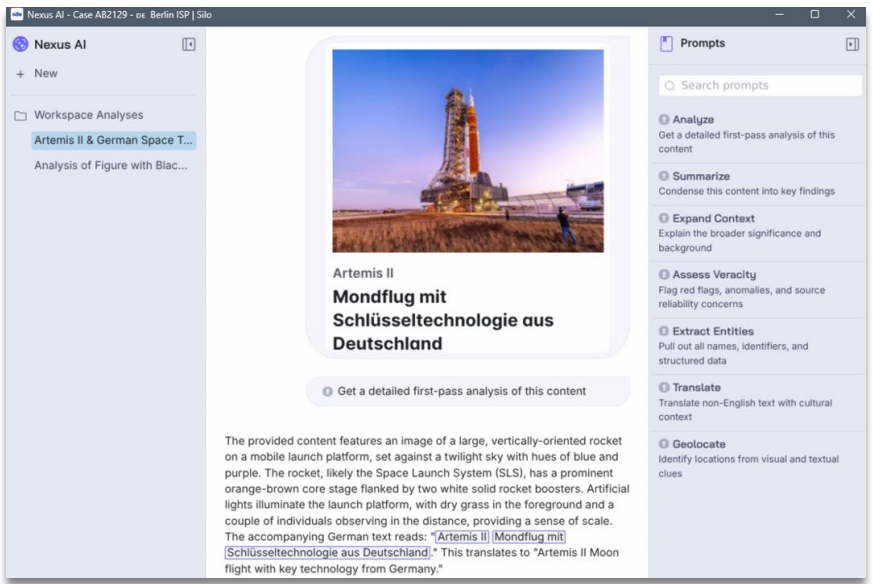
What Nexus Does
- Automated analysis — Captures and summarizes content automatically as you work. No prompt required to start.
- Active Annotations — Surfaces relevant leads and research threads with one-click pivots that do not disrupt your investigation flow.
- Grounded responses — Every answer is anchored to a verified source URL, giving you a clear path from analysis to evidence.
- Persistent conversations — AI conversation threads persist across your session and can be exported, imported, or shared via Silo Drive.
- Total anonymity — Queries are processed through the Authentic8 obfuscation layer. External AI providers see the request, never the requester, and queries are never retained for vendor training.
- Encrypted audit log — All AI interactions are captured in an immutable, encrypted log for compliance and oversight.
Admin Setup
Nexus must be enabled by your organization's administrator. Admins can manage access and configure prompt libraries for their users via Tools → Nexus AI in the Admin Console.
Getting Started
Once enabled by your administrator, Nexus is accessible within your Silo Workspace session.
Please contact Support for Admin and User Guides and to share your feedback.