
Disclaimer: Parts of this article may be outdated and maintained for legacy information purposes. Please do not rely on this guideline as the primary source for Log Extract examples
Please contact Support to request access to the latest Log Extract toolkit
The code examples below are provided for reference only. We recommend developing a custom script using practices best suited to your organization
Logs are stored in the Authentic8 database and can be exported manually from the Logs section of the Admin Console or programmatically via the Log Extract API
Programmatic access to the Log Extract API requires an authentication token issued by the Authentic8 Support team. Please have your organization’s Silo Administrator contact Support to obtain a token
Important: Effective March 30 2020, Authentic8 endpoints will only support TLS 1.2 connections and will cease support for TLS 1.1. If you use one of our native applications, please ensure their version meets the minimum requirement to support
Log Extraction Reference (Unencrypted Logs)
Below are the parameters for the Clear Text — Log Extract sample scripts:
-o — org name
-t — API token
-i <start_sequence_id>
-I <end_sequence_id>
-d <start date>
-D <end date>
Either -i or -d is used to specify the starting point of the log extraction. Optionally, -I or -D can be used to specify the end of the log extract timeframe. To prevent data loss or duplication, we strongly recommend using the sequence id value to keep track of the log records retrieved
Please refer to the Silo Logs Reference guide for supported Log Types
The result is a JSON object, which has three keys at the top level
is_more: a boolean which is true if more log files are available
next_seq: a sequence number to use with -i for the next set of log files
logs: a list of JSON objects representing the log lines
cURL Log Extract Example for Clear Text logs
curl -k -X POST https://extapi.authentic8.com/api/ \ -H "Content-Type: application/json" \ -d '[ {"command": "setauth", "data": "<api_token>"}, {"command": "extractlog", "start_seq": 0, "org": "<org_name>", "type": "URL"} ]' |
Python 3.x Log Extract for Clear Text logs (Reference Only)
import json import sys import urllib.request import urllib.error import urllib.parse from getopt import getopt def usage_abort(extra=''): sys.exit(extra + ''' Usage: log_extract -o <org_name> -t <api_token> [ -i <start id> | -d <start date> ] [ -I <end id> | -D <end date> ] Example: log_extract -o "org_name" -t auth.txt -d "2025-01-01 12:00:00"''') opt_array, args = getopt(sys.argv[1:], 'd:i:D:I:l:o:t:') if args: usage_abort(' '.join(args) + ' would be ignored') opts = dict(opt_array) ea_host = 'extapi.authentic8.com' if '-o' in opts: org = opts['-o'] else: usage_abort('Missing org') cmd = { 'command': 'extractlog', 'org': org, 'type': 'URL' } if '-i' in opts: cmd['start_seq'] = int(opts['-i']) if '-d' in opts: cmd['start_time'] = opts['-d'] if '-I' in opts: cmd['end_seq'] = int(opts['-I']) if '-D' in opts: cmd['end_time'] = opts['-D'] if not ('start_seq' in cmd or 'start_time' in cmd): cmd['start_seq'] = 0 if '-l' in opts: cmd['limit'] = int(opts['-l']) with open(opts['-t'], 'r', encoding='utf-8') as t: auth_data = t.read().strip() auth_cmd = { 'command': 'setauth', 'data': auth_data } req_data = json.dumps([auth_cmd, cmd]).encode('utf-8') req = urllib.request.Request( f'https://{ea_host}/api/', data=req_data, headers={'Content-Type': 'application/json'} ) try: with urllib.request.urlopen(req) as reader: res = json.loads(reader.read().decode('utf-8')) except urllib.error.URLError as e: sys.exit(f"Error: {e}") assert len(res) == 2 if 'result' in res[1]: print(json.dumps(res[1]['result'], indent=2, ensure_ascii=False)) else: print('Failure') import pprint pprint.pprint(res[1].get('error', {})) |
Log Extraction (Encrypted Logs)
Extracting and decrypting encrypted logs requires configuring a log encryption policy within the Silo Admin Console
Please refer to our Log Encryption guideline for more details
The following parameters are available for the sample scripts below:
-o — org name
-t — API token
-p — passphrase
-i <start_sequence_id>
-I <end_sequence_id>
-d <start date>
-D <end date>
Either -i or -d is used to specify the starting point of the log extraction. Optionally, -I or -D can be used to specify the end of the log extract timeframe
ENC is the only supported Log Type for encrypted logs
After extraction and decryption, the standard Authentic8 log types (e.g., AUTH, SESSION, URL) will be available, along with the following optional encrypted Log Types: CLIPBOARD, COOKIES, POST DATA and SMS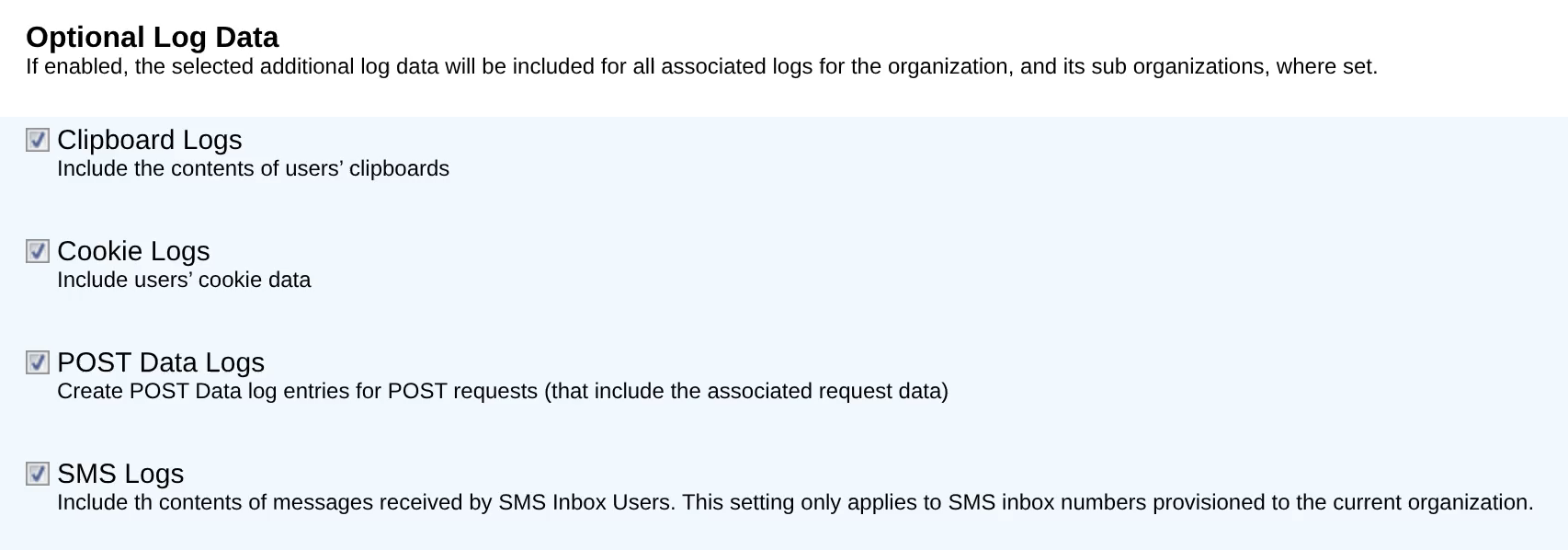
The result is a JSON object, which has three keys at the top level:
is_more: a boolean which is true if more log files are available
next_seq: a number to use with -i for the next set of log files
logs: a list of JSON objects representing the log lines
cURL Log Extract Example for Encrypted logs
curl -k -X POST https://extapi.authentic8.com/api/ \ -H "Content-Type: application/json" \ -d '[ {"command": "setauth", "data": "<api_token>"}, {"command": "extractlog", "start_seq": 0, "org": "<org_name>", "type": "ENC"} ]' |
Best Practice: For Windows systems, Cygwin can be installed as a way to utilize the cURL command-line tool
Python 3.x Log Extract for Encrypted logs (Reference Only)
#!/usr/bin/env python3 import base64 import json import sys import urllib.request import urllib.error import urllib.parse import argparse import seccure def usage_abort(extra=''): sys.exit(extra + '''\n Usage: enc_log_extract -o <org name> -t <api_token> -p <passphrase> [ -i <start id> | -d <start date> ] [ -I <end id> | -D <end date> ] Example: enc_log_extract -o "org_name" -t auth.txt -p passphrase.txt -d "2025-07-01 14:00:00"''') # Argument parsing parser = argparse.ArgumentParser() parser.add_argument('-o', required=True, help='org_name') parser.add_argument('-t', required=True, help='api_token') parser.add_argument('-p', required=True, help='passphrase') parser.add_argument('-i', type=int, help='Start ID') parser.add_argument('-d', help='Start date') parser.add_argument('-I', type=int, help='End ID') parser.add_argument('-D', help='End date') parser.add_argument('-l', type=int, help='Limit') args = parser.parse_args() ea_host = 'extapi.authentic8.com' # Construct command cmd = { 'command': 'extractlog', 'org': args.o, 'type': 'ENC' } if args.i: cmd['start_seq'] = args.i if args.d: cmd['start_time'] = args.d if args.I: cmd['end_seq'] = args.I if args.D: cmd['end_time'] = args.D if 'start_seq' not in cmd and 'start_time' not in cmd: cmd['start_seq'] = 0 if args.l: cmd['limit'] = args.l # Read authentication token with open(args.t, 'r', encoding='utf-8') as t: auth_cmd = { 'command': 'setauth', 'data': t.read().strip() } # Read passphrase with open(args.p, 'r', encoding='utf-8') as p: passphrase = p.read().strip() # Send request req = urllib.request.Request( f'https://{ea_host}/api/', data=json.dumps([auth_cmd, cmd]).encode('utf-8'), headers={'Content-Type': 'application/json'} ) try: with urllib.request.urlopen(req) as response: res = json.load(response) except urllib.error.URLError as e: sys.exit(f'Error connecting to API: {e}') assert len(res) == 2 if 'result' in res[1]: for l in res[1]['result']['logs']: l['clear'] = json.loads( seccure.decrypt(base64.b64decode(l['enc']), passphrase, curve='secp256r1/nistp256') ) print(json.dumps(res[1]['result'], indent=2, ensure_ascii=False)) else: print('Failure') import pprint pprint.pprint(res[1]['error']) |